SmartParkingONYX · oPlate
SmartParking · oPlate recognition at the lane

Every vehicle through the lane gets a plate, a photo and a record.

An edge AI box at the lane reads the license plate on the spot. The SmartParking server matches the plate with the card, calculates the fee, commands the boom barrier and records every transaction. Attendants only need a browser; owners see every site on one screen.

  • Plates single-row, two-row
  • Cards UHF · Wiegand · USB
  • Web nothing to install at the lane
  • Live lane view on a phone
  • Multi-site one screen
ENTRY LANE 1 CAM-01 · AI Box Illustration
30A-000.00 PLATE
  • Camera sees the vehicle, AI box opens a session
  • oPlate reads plate 30A-000.00 across frames
  • Server matches plate with card, grants entry
  • Barrier open command, controller confirms
Illustration of an entry lane: a car approaches, the recognition frame scans the dummy plate 30A-000.00, the result card shows the plate and entry time, and the barrier opens to let the car through.
01 One vehicle, step by step

From the moment a vehicle enters the frame to the moment it is on record

The AI box sees, the server decides, the controller opens, the ledger records.

  1. 01Camera

    Sees the vehicle

    The lane camera streams to the AI box next to it.

  2. AI30A-000.0002AI box · oPlate

    Reads the plate

    Reads single-row and two-row plates across several frames.

  3. 03Server

    Matches and decides

    Matches plate with card, checks access, calculates the fee.

  4. 04Controller

    Opens the barrier

    Open commands are acknowledged and resent when needed.

  5. ₫05Ledger

    Records the transaction

    Stored with entry and exit photos and the amount collected.

Want to see it on your own lanes?Schedule a technician survey →
02 Real lanes

The lane screen at rush hour

A screen recording of the lane operations screen at a working motorbike car park: a vehicle arrives, the plate is read, the transaction is matched and charged, and entry and exit photos appear side by side.

REAL FOOTAGEEntry · Exit
Two lanes on one screenA motorbike entry lane and exit lane running side by side, each with a live view, the recognised plate, the fee and the transaction photos.
REAL FOOTAGE
Motorbike exit lane, peak hourVehicles leave one after another; each transaction shows the parking duration and the amount as soon as the vehicle arrives.

Real footage from a car park in operationThe operator's name is hidden

03 Standout features

Built for the lane, the cash desk and the manager

Only what is already running at real car parks.

LANE

Entry and exit

Runs in the browser, even on a phone.

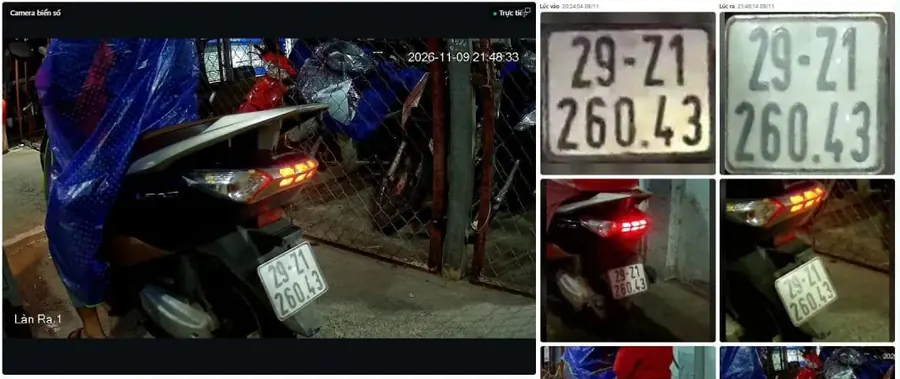
Real lane screen: camera view and plate crops at entry and exit
Plate onlyPlate + cardPlate + face
  • Live camera view in the browser, even on a phone.
  • Plate–card matching for UHF, Wiegand, USB.
  • Plate before card: fee calculated at once.
  • Manual opening requires a reason.
  • Shadow mode before controlling real hardware.
oPlate

License plate recognition on the AI box

oPlate reads the plate at the lane and sends it with photos to the server.

30A-000.00
  • Single-row and two-row, tilted plates.
  • Multi-frame voting, no vehicle split in two.
  • Glare reduction, self-learns bumps and road markings.
  • Automatic tuning of Hikvision, Dahua cameras.
  • Face matching (optional, per lane).
Runs on: AI.Box or PCAI.BoxPCAI.Box sized by AI compute (TOPS) to match the number of lanes
CASH

Fees and reconciliation

₫SHIFT 1SHIFT 2
  • Tariffs by shift, hour, vehicle group.
  • Cash closing per attendant and shift.
  • Customer display and LED board show the amount.
PASS

Monthly passes and access rights

  • Renew, lock, revoke; expired cards blocked.
  • Access by vehicle group and time window.
  • Bulk import from Excel/CSV.
DATA

Reports

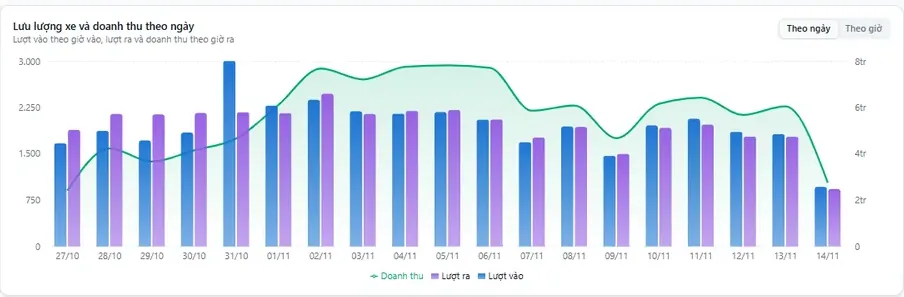
Real chart: entries, exits and revenue per day
  • Revenue and transactions by shift, time slot; Excel export.
  • Device alerts via Telegram, Zalo, email.
OPS

Multi-site admin, remote operations

ORGSITE 1SITE 2GATE 1GATE 2GATE 1LANE 1LANE 2LANE 1
  • Organisation → site → gate → lane, data kept separate.
  • Role-based access, single sign-on (OIDC).
  • AI box and firmware updates remotely.
  • Safe releases, nightly backups.
PRIVACY

Controlled access to sensitive images

Face and ID images are visible only to authorised users; every view is logged.

04 Technology know-how

Lanes jam on the odd cases. These ones are already handled.

A good parking system does not only work when everything goes smoothly. Here are situations attendants meet every day and how SmartParking handles them.

CA-01

Plate read differently at entry and exit

Strict fuzzy matching; a mismatch keeps the barrier closed until the attendant confirms.

CA-02

Vehicle enters without tapping a card

Recorded as the vehicle leaves the frame; a late card tap joins the same transaction.

CA-03

Lost card, wrong card

A dedicated flow right on the lane screen, with no manual data edits.

CA-04

Bicycles and vehicles without plates

A dedicated flow, so the lane never stalls waiting for a plate.

CA-05

Slow network, attendant clicks open twice

The same action opens the barrier only once; every manual opening has a reason in the log.

CA-06

Server restarts while a vehicle is in the lane

Lane state is rebuilt; entries left hanging too long are closed automatically.

CA-07

Special plates that are often misread

A reference plate list replaces recurring misreads.

CA-08

Headlight glare at night, speed bumps mistaken for plates

Glare reduction and static-object learning on the AI box; junk reads are dropped before sending.

Screens

Attendant and manager screens

Live

Watch live camera views right in the browser, even on a phone

No app to install: open the browser, sign in and see the lanes running.

  • Remote viewing of the lanes and sites you are authorised for.
  • No app: works on a computer, tablet or phone.
  • Per-user access: each account sees only what it is assigned.
LIVE
Real footage: motorbike exit lane operations screen in phone format with the live camera view; the operator's name is hidden.
Operations screen of an exit lane: camera view, recognised plate, fee, entry and exit photos, gate event log
Lane operations screenLive view, recognised plate, parking duration and fee, entry photos next to exit photos; gate events on the right.
Overview report: transactions, vehicles on site, daily traffic, revenue by shift
Overview reportTransactions, vehicles on site, revenue by day, by shift, by vehicle type, by parking duration and by lane.

Real screenshots from a car park in operation; the operator's name is hidden.

05 Deployment

One software release, two ways to host the server

Choose by each site's network and data-residency needs.

Option A

Cloud server

SITE 1SITE 2CLOUD

Many sites on one server; each organisation sees only its own data.

Best forParking chains
UpdatesOnce for every site
Option B

On-site server

ON SITELOCAL NETWORKCENTRAL

The site keeps running when the internet is unreliable; data stays on premises.

Best forWeak connectivity, on-premises data
InstallOffline, automatic rollback
IP camera

Hikvision, Dahua; tuned remotely.

AIPCAI.Box or PC

Runs oPlate, no hardware lock-in.

Barrier + controller

Relays, LED, buzzer; remote firmware.

Card reader

UHF, Wiegand, USB.

Attendant station

Just a browser.

Suitable for HospitalsOffice buildingsResidential buildingsShopping mallsFactoriesParking chains
06 FAQ

Frequently asked questions

Do we need to install software on the lane computer?
No. The lane operations screen runs in a browser, even on a phone. If the attendant station fails, switch to another device, sign in again and carry on.
Where is the license plate read?
Right on the edge AI box at the lane, by the oPlate recognition software. The AI box sends the result with photos to the SmartParking server, which matches it with the card, calculates the fee and commands the barrier.
What if the internet connection is unreliable?
For sites that need to be self-sufficient, the SmartParking server can sit at the car park so lanes run on the local network; data is reported to the central server whenever the connection is available.
How does an operator with several sites manage them?
Each site is a branch with its own gates and lanes. Managers see revenue, transactions and device status for every branch on one screen, within the permissions they are granted.
How are face images handled?
Face capture is optional and set per lane. Sensitive images can only be viewed by authorised users, and every view is logged.
Can we reuse our existing cameras and barriers?
A technician will survey the equipment already on site. SmartParking can control Hikvision and Dahua cameras; everything else is assessed during the survey.
Start with one lane

Let a technician look at your lanes

We survey your cameras, barriers, network and how the site collects fees today, then recommend the right way to host the server.

Talk to sales